

Short answer
Choose one important task and prove that it can be completed under the conditions your users actually face. Save the right state locally, make pending synchronisation visible, prevent duplicate submissions, and provide an SMS or human fallback where the task cannot wait. Test the whole journey with weak bandwidth, interrupted power, shared devices and a clear recovery path.
A digital service can look dependable in an office and fail at the moment a user needs it. A field worker loses a completed form when the signal drops. A clinic cannot send an update after a power cut. A customer taps submit again because the first attempt never produced a trustworthy answer.
The design question is not whether the service works on the fastest connection available to the product team. It is whether the important task survives the slow, interrupted and shared conditions in which people actually use it.
Make the worst reasonable condition part of the brief
Start by describing the operating conditions, not by choosing an architecture. The service may be used on an entry-level phone, a shared tablet, a low-cost laptop or a device that is almost out of battery. The connection may be slow, intermittent or unavailable for part of the task. Power may return only long enough to charge a device and send a short update.
These are not edge cases if the audience includes field teams, schools, clinics, community programmes or customers outside a reliable office network. The French ecological-design reference recommends testing a service with low-bandwidth connections and providing an offline mode where the function can technically work offline. That is a test condition, not a promise that every feature will work without a network.
Write the boundary clearly:
- the task that must remain possible;
- the information that must be available on the device;
- the information that may wait for synchronisation;
- the action that must be confirmed by the server or a human; and
- the person who owns a failed or disputed record.
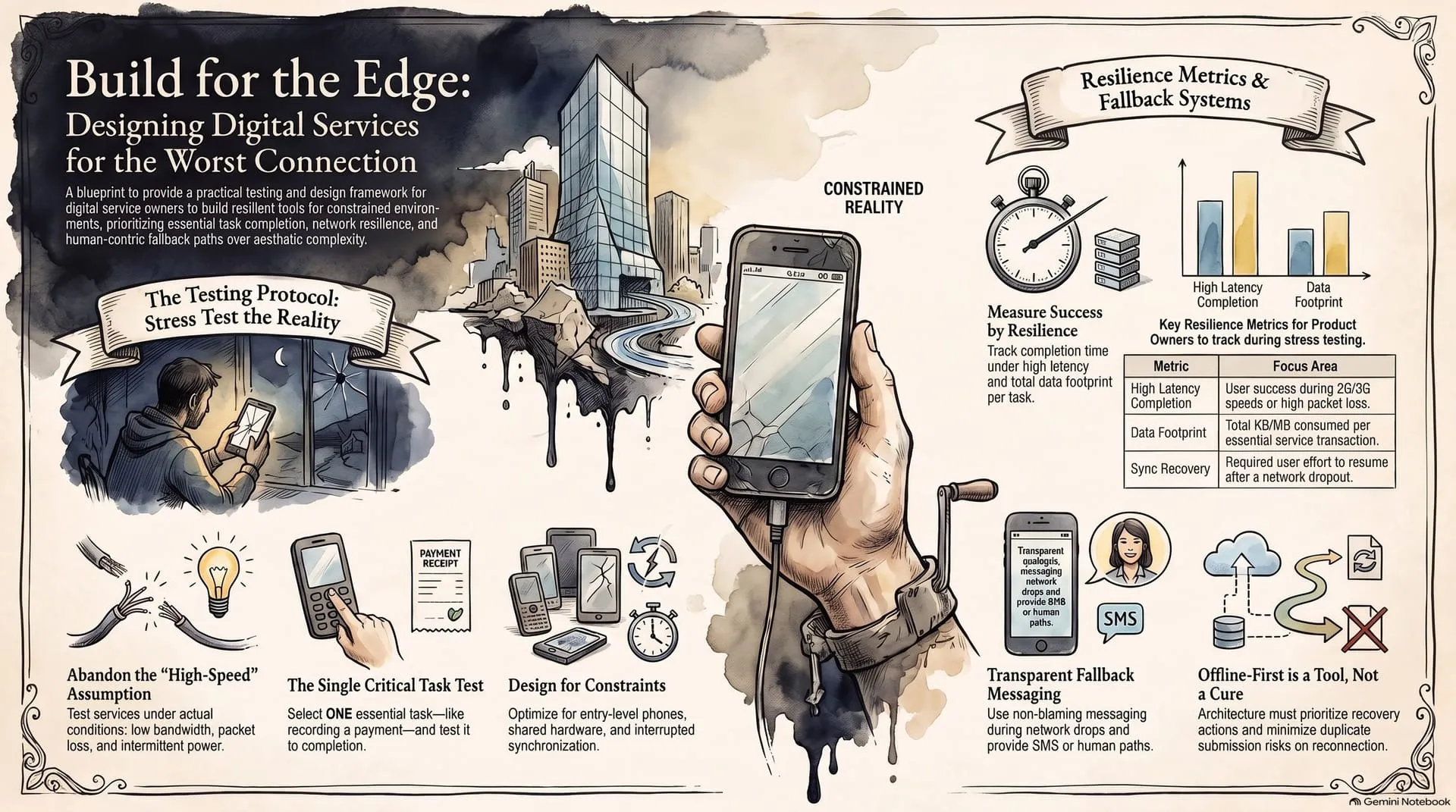

Test one important task from start to finish
Do not begin by testing every screen. Choose one task that matters: submit a request, record a payment, report a fault, update a beneficiary record or receive an alert. Give the task a named user, device, location and success definition.
Then run the task in sequence:
- Start with a normal connection. Let the user open the task and enter enough information to make it real.
- Interrupt the connection. Reduce the bandwidth, switch the device to flight mode, move into a known weak-signal area or stop the connection during submission.
- Interrupt the power or device. Close the application, restart the phone, switch to a shared device or continue with low battery. Test what the user sees when the application returns.
- Reconnect and inspect the result. Confirm whether the record synchronises once, twice or not at all. Check what the user, the support person and the server each believe happened.
Measure time to complete, data used, battery impact, failure points, duplicate submissions, missing fields, support escalations and the exact action required after reconnection. The point is not to make a favourable demo. It is to expose the work the service has shifted to the user or the support team.
Make the local state and the server state honest
Offline-capable design is not a decorative “offline mode” label. The service needs a clear local state, a clear remote state and a controlled way to move between them. Android’s offline-first guidance separates local and network data sources, recommends writing important local state before a later synchronisation, and warns that reconnection introduces conflict-resolution work. Flutter’s guidance makes the same trade-off explicit: a local write can protect the user’s work, but local and remote records can then be out of sync.
For each critical record, decide what these states mean:
- Saved on this device: the user can return to the record, even without a connection
- Waiting to send: the record is stored locally but has not been accepted by the service
- Accepted: the server or authorised person has confirmed the action
- Needs attention: synchronisation failed, the record conflicts with another change or the user must correct something
Give each submission a durable reference so that a retry cannot silently create a second payment, report or request. Decide how conflicts are reviewed. “Try again” is not a conflict policy, and a green tick is not proof of server acceptance unless the system can support that meaning.

Design the fallback before the failure
An SMS message can be useful when a full application is not available. It may carry a short alert, a reference number, a collection time or an instruction to call a named service desk. A human fallback may be safer for a disputed payment, a safeguarding concern, a clinical escalation or a record that contains more detail than an SMS should carry.
Do not make the fallback an afterthought. Specify:
- which events trigger an SMS, phone call or human review;
- what minimum information the fallback carries;
- how the user proves or explains the pending action;
- who receives the escalation and within what operating window; and
- how the final outcome is written back into the main record.
The fallback must not blame the user. “Invalid request” hides too much. “Your request is saved on this device but has not reached the service. Keep reference 4F82 and try again when you have a connection. If it remains pending, call the programme desk” gives the user a status, a reference and a next step. Replace the example reference with a real generated identifier in the product.
Account for shared devices, power and support
Low connectivity is only one constraint. A service can fail because a user shares a device, cannot charge it overnight, loses access to a SIM card, has limited storage or cannot install the latest application version. A local queue also creates a security and privacy question: what sensitive information remains on the device, who can open it, and what happens when the device is lost or handed to the next person?
Ask the team to test the service with the real device range and the real support capacity. If the workflow needs a specialist to repair every failed sync, the design has not yet matched the operating environment. If the service stores more data locally than the task requires, reduce the local copy or add a controlled expiry and removal process.
Do not claim that offline-first solves access
Offline-first can protect a task during a connection interruption. It cannot make a phone affordable, create electricity, provide a safe place to charge, replace a trained worker or resolve every identity, language and accessibility barrier. It can also introduce stale information, conflicts, device-security risk and extra support work.
The right question is narrower: which part of this service must remain usable, on which device, for how long, and with what evidence when the connection returns? A small, well-tested offline capability may serve people better than a broad promise that the whole system works everywhere.
Keep a one-page constrained-service test record
Before expanding a pilot, record the result in a form that a product owner, programme lead and support person can all read:
| Field | Record |
|---|---|
| Critical task | What the user must complete and why it matters |
| Conditions | Device, power state, bandwidth, interruption point and shared-use context |
| Local state | What is saved, for how long, and who can access it |
| Sync rule | Queue, retry, conflict and duplicate-prevention behaviour |
| Fallback | SMS, phone, paper or human route, with owner and escalation step |
| Evidence | Time, data used, failures, duplicates, recovery action and unresolved gaps |
Build the test around the worst reasonable connection, not the best available demonstration. When the service can preserve the user’s intent, explain its status and recover without duplicate work, it is ready for a more honest conversation about scale. When it cannot, the test has done its job: it has shown the next design decision.
Frequently asked questions
Does offline-first mean that a service no longer needs the internet?
No. It means that a defined set of important tasks can continue without a reliable connection, while the service makes its local, pending and synchronised states visible. Some actions, such as a payment that must be confirmed immediately, may still need a live connection or a separate human process.
What should a team test first?
Choose one task that matters to the service: submitting a request, recording a payment, reporting a fault or receiving an alert. Test it from the user’s first action to the final confirmation under weak bandwidth, interrupted power and the actual devices people use. Do not begin with a technology label.
What should happen when synchronisation fails?
The service should preserve the local record, show that it is pending or failed, prevent an accidental duplicate, and tell the user what to do next. A named support owner needs a way to inspect the record, retry it, resolve a conflict or use the approved fallback.
Is SMS a complete replacement for an application?
Usually not. SMS can carry a short alert, reference number or next instruction, but it may not provide the context, identity assurance or evidence needed for every transaction. Treat it as one fallback in a service design, alongside a human route and a clearly defined escalation path.
Sources & the researchers worth crediting
Working references: Machine and Computing Technologies for Sustainable Development - Proceedings of MCT4SD 2025, Volume 3, for low-cost IoT, SMS alerts, community deployment and uncertainty-reporting themes; Designing the AI-Driven Data Foundations, for deploy-anywhere, performance and cost principles; and the official technical guidance linked below. The article turns those ideas into a service-design test. It does not claim that offline-first removes every access, power, device or support constraint.
Read next
Choosing a Network for a Multi-Branch Business
Assess failover, traffic priority, security, support and outage evidence before selecting a network.
A Four-Year Life Plan for Office Computers
Match devices to the work, then plan maintenance, upgrades, redeployment and retirement.
Review a digital service workflow
Start with one important task and turn its failure points into a practical service brief.
About the author
Peter Bamuhigire
Software architect and ICT consultant — business management systems across Africa
Peter Bamuhigire helps owners, programme teams and service operators turn technology decisions into workable systems. His approach connects software design with infrastructure, people, data, support capacity and the conditions in which the service must operate.